Comparison

Spreadsheets are fine. Until four specific days.

Nobody outgrows Excel gradually. It works, and then on one particular day it does not — and it is almost always one of these four. This page is about which of them you have already had, because that is a better buying signal than a feature grid.

The day somebody disputes a deduction

They say they were in on the 14th. The sheet says they were not. There is no evidence either way, because the record was typed by the person being asked about it — and now the argument is about the spreadsheet rather than about the day.

The day a balance cannot explain itself

"Why is my casual leave 6.25?" Somebody edited a row in March, somebody adjusted a figure in June, and the formula has been dragged over a merged cell. The number might be right. Nobody can show that it is.

The day a raise rewrites last year

You update the salary column in April and every payslip formula recalculates — including the ones for months already paid. An employee downloads last September's payslip and it no longer matches the one they were sent.

The day you ask which project made money

The salary sheet is in one file, the hours in another, the invoices in a third, and joining them is a weekend. So it does not get done, and pricing stays a guess for another year.

Side by side

The same jobs, done two ways

Honest where a spreadsheet wins, too — it is faster to start and it bends to anything.

The jobSpreadsheetsSpyne
Getting started Immediate. A blank sheet costs nothing and bends to anything. An afternoon to set up people, salaries and holidays.
Attendance evidence Typed by somebody, from memory or a WhatsApp group. Captured at the punch, with the IP the server saw and optional location.
Leave balances A cell. Correct until somebody edits a row above it. Summed from an append-only ledger, so it can always show its working.
Payslip history Recalculates. Change a salary and last year changes with it. Frozen at issue. A correction is a new version beside the original.
Who changed what Version history, if it is on a shared drive and nobody downloaded a copy. Audited on the row: who, when, why, and the previous value.
Project profitability Possible, over a weekend, joining three files by hand. Derived continuously from payslips and logged hours.
GST invoice numbering Gaps the first time two people raise one on the same afternoon. Reserved under a lock. Gapless within the financial year.
Who can see salaries Whoever has the file. Sharing is all or nothing. A specific permission, flagged as sensitive when you grant it.
Bending to an odd requirement Add a column. Anything is possible in a sheet. Configurable where it matters; not infinitely.
Cost Effectively free, plus the hours nobody counts. From ₹399 a month for the whole company.
What actually changes

Not "digitised". Connected.

Moving a spreadsheet into a web form gains you very little. What is worth the change is that the record stops being four disconnected files — and starts being one chain you can follow from a person's morning to a project's margin.

  • One number, one source Paid days exist once, and payroll reads them.
  • History that stays put Issued documents are snapshots, not formulas.
  • Questions answerable in seconds Which project lost money, who has not confirmed the security policy, who is holding the spare laptop.
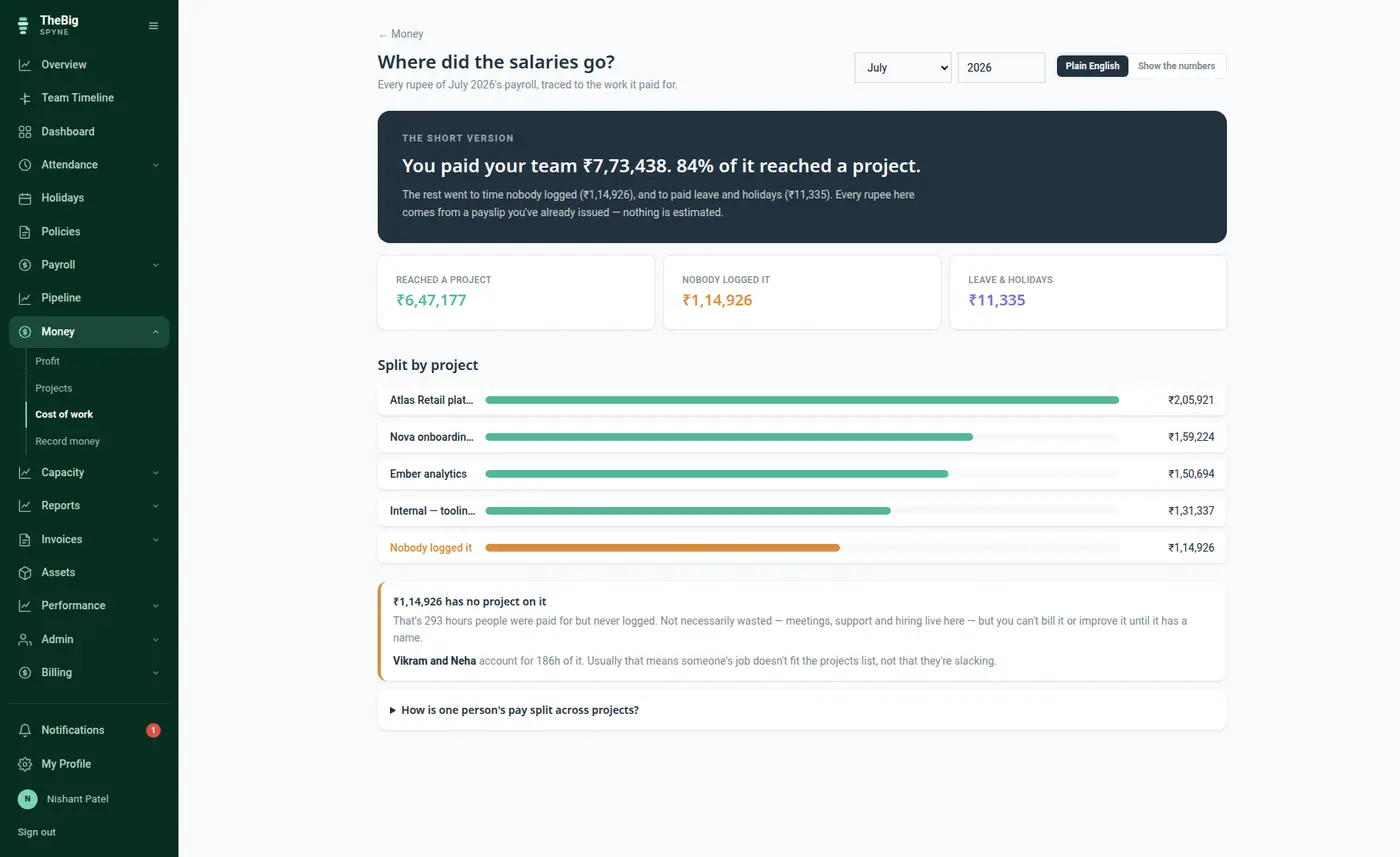
The cost of work screen showing how much of the month's payroll reached a project and how much nobody logged
Where the salaries went. The unlogged figure is the honest part, and it is named rather than spread.
Questions

Moving off a spreadsheet

Can we import what we already have?

Yes — employees, assets, clients and money entries all import from CSV or Excel, and each has a downloadable template so you can see the expected shape first. Every import previews what it will do before it writes anything.

Do we have to move everything at once?

No, and most people should not. Start with attendance and leave for a month; add payroll when you trust the days. Invoicing and profitability can wait until the people side is settled.

What about our historical payslips?

Keep the PDFs you have already issued — they are already the record. Spyne starts from the month you begin with; there is no need to re-run last year, and re-running it would create documents your employees never received.

Can we still export to a spreadsheet?

Every list exports to CSV, always covering the whole filtered set rather than the page on screen. Plenty of customers still do their board reporting in Excel — the point is that the source of truth is no longer there.

Try it against a month you already know

Run one month in parallel with your sheet. If the numbers disagree, one of them is wrong and it is worth knowing which.